One page for each service you want more of, proof on every page, a phone number that works from a phone, and a request form that asks only what the office needs to schedule a visit, with a stated callback time. Everything else on an electrician's website exists to move a visitor onto one of those service pages and then to the call or the form.
Which services need their own page
Give a page to each job you want more of and can describe on its own terms: panel upgrades, EV-charger installation, troubleshooting and repairs, lighting and ceiling fans, rewiring older homes, generators or batteries if you offer them, and commercial work if you take it. A page per job lets a search campaign send each click to a matching page, lets the Business Profile link each service to the page that explains it, and lets you write the questions and proof for that job rather than for "electrical services" in general. City pages come later, and only with real work from that city to show; see the panel-upgrade and EV-charger page outlines for how deep a service page should go.
What proof builds confidence
A homeowner is letting a stranger into the panel. The page should make the decision easy:
- Your license number, on every page. California's Contractors State License Board requires the license number in advertising, and a website is advertising; it is also the first thing a careful homeowner checks.
- Insurance and bonding, stated plainly.
- Photos of finished work with captions that name the job and the city, not stock images of someone else's van.
- Reviews that mention the job, pulled from your Business Profile, with a link to read the rest.
- The people: the owner's name and face, how long the company has operated, and who will arrive.
- What happens next: how fast you call back, how estimates are given, whether there is a visit fee and how it is applied.
- The service area, named, so a visitor from outside it does not waste a call and one inside it knows you come.
How much should the request form collect?
Enough to schedule a visit or quote a range, and no more. Name, phone, city, the service from a short list, a sentence about what is happening, a preferred time to be called, and an optional photo. Email can be optional if the phone is required. Every extra field costs completed forms, and anything else the office needs can be asked on the callback. State the callback window beside the button and keep it. Our website design work starts with this form and the phone path, because they are where most sites lose the visitor.
Phone links and routing
The number at the top of every page is a tap-to-call link, not an image or plain text. Hours are shown next to it, and the after-hours behaviour is decided and stated: an answering service, an on-call phone, or a clear "leave a message and we call at 7 a.m." A tracking number per campaign lets you see which page produced which call, and a sticky bar on phones keeps the call and request buttons in reach while the visitor scrolls.
A demo mobile wireframe
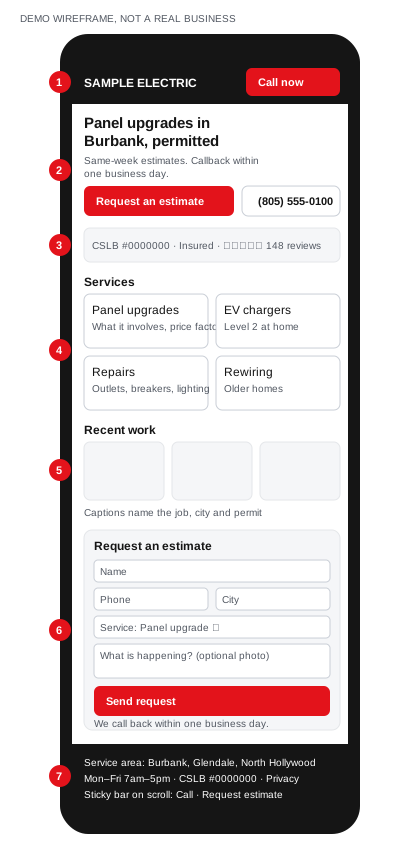
Demo wireframe for a fictional "Sample Electric" in Burbank. Not a real business or a client site.
- Header: the business name and a call button, visible on every screen.
- Hero: one service and one city in the headline, the callback promise, and two actions: request an estimate, or call.
- Proof strip: license number, insurance, review count and rating, right under the headline.
- Services: one block per job, each linking to its own page.
- Recent work: photos captioned with the job, the city and the permit, which doubles as evidence for Maps and search.
- Request form: the short intake described above, with the callback promise beside the button.
- Footer and sticky bar: service area, hours, license number, the privacy policy, and the two actions pinned to the bottom of the screen on phones.
The test checklist
Run it on a phone before any traffic is sent to the site, and again monthly.
- Submit the form from a phone. Confirm it arrives, who receives it, and that the confirmation message states the callback window.
- Submit it again with the honeypot or spam protection in place and check nothing legitimate is blocked.
- Tap every phone number on every page. Each should open the dialler with the right number, including the tracking numbers.
- Call the tracking number and confirm it rings the right phone and records the call.
- Time the callback on a test submission during business hours.
- Check that each service page loads in a few seconds on a mobile connection and that nothing blocks the first screen.
- Confirm the license number, hours and service area read the same on the site, the Business Profile and the ads.
- Open every link in the header, footer and service blocks; none should 404.
- Check that each service page has one H1, a title under 60 characters, and a description that names the service and the area.
- Send a form submission from outside the service area and confirm the office knows how to answer it.
The Burbank example
A hypothetical Burbank electrician with a single "services" page lists twelve things they do and one phone number in the footer. Splitting it into panel upgrades, EV chargers and repairs, adding the license number and three captioned photos to each, moving the number into a tap-to-call header, and shortening the form to six fields changes what every visitor sees first: a page about their problem, evidence, and a way to act. That is a planning illustration, not a client result. The order we work in is the same for any trade: service pages and proof first, then the form and phone path, then the campaigns that send people to them.
Frequently Asked Questions
Should prices be on an electrician website?
Publish the factors, not the figures, unless you offer fixed-price services. Explain what changes the price of a panel upgrade or a charger install so the visitor arrives at the estimate ready to decide, and state any visit fee and how it is applied.
Do I need a chat widget or an AI receptionist on the site?
Only if someone answers it as fast as the phone. A chat window that replies the next morning loses more trust than a clear callback promise. If calls are missed after hours, an answering service or AI receptionist that collects details is the better fix.
How many pages does an electrician website need?
A home page, one page per service you want more of, an about page with the people and the license, a contact page, and a privacy policy. Add city pages only when you have work from that city to show.
Sources
- Contractors State License Board (California), Fast Facts: Advertising Guidelines for Contractors (license number required in all advertising, including websites, under Business and Professions Code section 7030.5), checked November 2026.
- Google Ads Help, About Quality Score for Search campaigns, checked November 2026.
- Google Business Profile Help, Tips to improve your local ranking on Google, checked November 2026.